
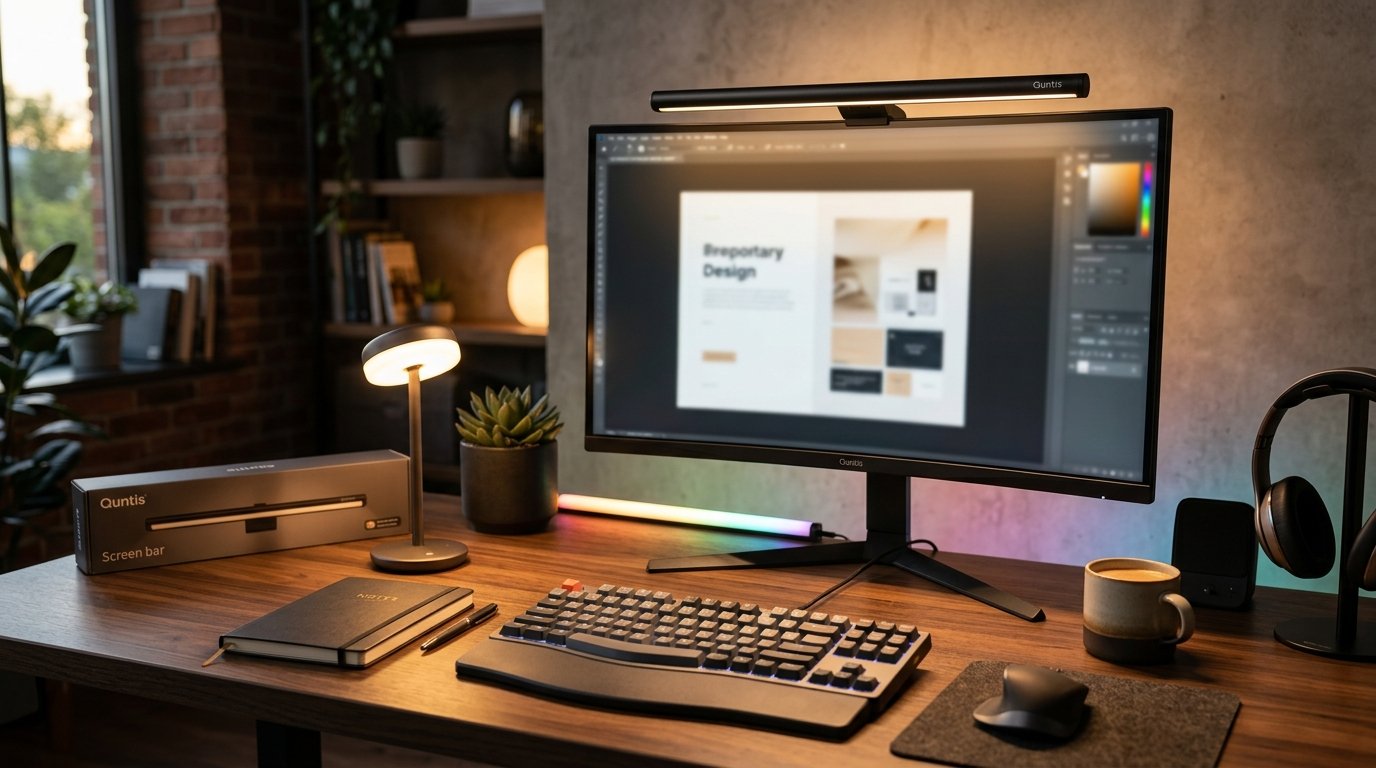
Monitor Light Bars: Glare-Free Screen Lighting
Showing all 29 results
-

31.5″ super wide monitor light with no glare,auto-dimming &brightness adjustment architect table lamp
-

Dual-head eye-caring desk lamp, no blue light, usb powered, dimmable led clamp light for reading, study & office, soft light that won’t hurt eyes
-

Led screenlinear desk fold,double head led tall desk lamp for home office,(30.7inch)
-

Led screenlinear focus series,eye-care architect clamp desk lights for home office (31.5inch)
-

The Neon Sign 3-stage foldable desk lamp studio 82 cm (32.3 inch) black, luxury dual control smart radar motion sensor, high cri eye care multi scene task lamp for professional workspace
-

The Neon Sign curved monitor light bar focus 45 cm (17.7 inch) black, with remote control and touch, smart auto dimming, stepless dimmable eye caring no glare screenbar, fit for various monitors
-

The Neon Sign curved monitor light bar g-zone 45 cm (17.7 inch) black, wireless dual control with 13 modes rgb backlight, adjustable color temperature and brightness, eye caring no glare lamp for immersive gaming and office
-

The Neon Sign curved monitor light bar glow 66 cm (26 inch) black, foldable dual head for curved screens, wireless remote with ambient warm backlight, eye caring stepless dimmable led screen lamp
-

The Neon Sign curved monitor light bar im 66 cm (26 inch) black, foldable dual light with 15 modes rgb backlight, wireless remote for 34 inch plus ultrawide curved screens, eye caring no glare stepless dimmable gaming lamp
-

The Neon Sign dual-head led desk lamp with clamp, ultra-wide office lamp for dual monitors, 360° flexible gooseneck architect lamp with auto-timer & touch control, cri>90 eye-caring task light – black
-

The Neon Sign flex desk lamp studio 78 cm (30.7 inch) grey, led screenlinear desk fold pro, double head architect desk light with clamp
-

The Neon Sign monitor light bar focus 40 cm (15.7 inch) black, eye caring led screenlinear basic
-

The Neon Sign monitor light bar focus 41 cm (16.1 inch) grey, monitor light bar with remote, fit for curved monitors/camera base, eye-care computer screen light bar, auto-dimming dimmable work office gaming desk lamp
-

The Neon Sign monitor light bar focus 51 cm (20.1 inch) black, pro+ with remote control, fit for curved or flat monitor, eye-care auto-dimming, no glare gaming home office desk lamp
-

The Neon Sign monitor light bar focus 52 cm (20.5 inch) black, led screenlinear basic plus, for desk home and office
-

The Neon Sign monitor light bar focus dual-control 41 cm (16.1 inch) grey, smart auto dimming screen monitor lamp, eye caring no glare asymmetrical light bar, stepless dimmable touch control led task lamp for home office
-

The Neon Sign monitor light bar focus dual-control 41 cm (16.1 inch) white, wireless remote with smart auto dimming sensor, eye protection no glare asymmetrical led screen lamp, modern desktop aesthetic for office and gaming setup
-

The Neon Sign monitor light bar focus radar 52 cm (20.5 inch) grey, screenlinear radar pro plus with wireless remote, smart motion sensor and touch control, asymmetric high cri eye care stepless dimmable screen light
-

The Neon Sign monitor light bar glow 41 cm (16.1 inch) grey, wireless remote control, eye-care monitor backlight, stepless dimming and color temperature, no glare
-

The Neon Sign monitor light bar glow 41 cm (16.1 inch) pink, with wireless remote eye care no glare, stepless dimming modern desktop aesthetic, ideal gift for girls
-

The Neon Sign monitor light bar glow 41 cm (16.1 inch) white, wireless remote with ambient backlight, eye care no glare stepless dimmable computer lamp, aesthetic desk setup for curved gaming monitor reading and study
-

The Neon Sign monitor light bar glow 42.5 cm (16.7 inch) grey, with wireless remote and backlight, smart auto dimming and timer, eye care no glare stepless dimmable lamp for gaming home office or curved monitors
-

The Neon Sign monitor light bar glow 51 cm (20.1 inch) grey, led screenlinear glow plus, dual light
-

The Neon Sign monitor light bar im 40 cm (15.7 inch) black – rgb dimmable screenbar, usb powered eye-care task light for computer monitor
-

The Neon Sign monitor light bar im 51 cm (20.1 inch) grey, pro plus with remote, 15 modes rgb gaming backlight, ra95 eye care dimmable frontlight, no glare and upgraded clip for all monitors
-

The Neon Sign monitor light bar im 51 cm (20.1 inch) pink, wireless remote with 15 modes rgb backlight, professional ra95 eye care no glare, upgraded clip desktop aesthetic lamp for all monitors and gaming setup
-

The Neon Sign piano light studio 60 cm (23.6 inch) black, max 12w professional eye caring lamp with smart auto-dimming sensor
-

The Neon Sign universal camera mount for eye-care lamps & monitor light bars, 3m adhesive base, compatible with most desk lamps
-

Transform your desk setup with a 20″ The Neon Sign led monitor light – wireless remote, eye-friendly ra95 illumination, ambient rgb backlighting, and universal fit for all screens
The Neon Sign Task Lights: LED Desk Lamps and Monitor Light Bars for Focused Work
The Neon Sign built its reputation on one product line: monitor light bars, starting with the original screen-mounted bar that shipped in 2020 and popularized the “no glare on your screen” pitch in home offices. That single-purpose focus shows in the current lineup. Rather than trying to be a general lighting brand, The Neon Sign engineers task lights around a narrow set of problems: screen glare, blue-light fatigue during long sessions, and desk space lost to bulky lamp bases. If you spend six or more hours a day in front of a monitor, that specialization matters more than a longer feature list.
Monitor light bars vs. traditional desk lamps
The monitor light bar clips onto the top edge of a screen (compatible with panels from roughly 14 to 34 inches, curved or flat) and throws light downward onto the keyboard and desk, never into your eyes and never reflected back off the glass. This asymmetric optic design is the actual mechanism behind the “no glare” claim: the light housing is angled so the beam clears the screen surface entirely instead of relying on diffusion alone. A gooseneck desk lamp, by contrast, sits beside or behind the monitor and lights a wider area, which suits people who split time between a laptop, paper notes, and a keyboard tray. If your desk holds two monitors side by side, a bar mounted on the primary screen still covers both, since the beam spreads roughly 100cm across a standard desk at typical mounting height.
Color temperature and dimming range for reading and screen work
Most The Neon Sign models run from 2700K to 6500K, a range wide enough to move from a warm, amber tone for evening reading to a cool 6500K daylight setting for daytime concentration. What separates a usable lamp from a gimmicky one is the number of steps between those extremes: look for at least 10 discrete brightness levels rather than a single high/low toggle, since a jump from 20% to 100% brightness with nothing in between forces you to either squint or get blasted. Lumen output in the 400-600 lumen range at the desk surface is enough for reading fine print or handwriting without overpowering a glossy monitor’s reflectivity. Touch-slider controls, rather than click-through button cycling, make it faster to dial in the right level once you know your preferred setting for a given time of day.
Practical features: memory function, USB passthrough, CRI rating
A memory function that recalls your last brightness and color temperature after power-off sounds minor until you’re the person re-adjusting a lamp every morning. Several The Neon Sign bars and lamps also include a USB-A or USB-C passthrough port on the base or clip, letting you top up a phone without adding a second cable to your desk setup. Check the CRI (Color Rendering Index) spec before buying if you do any color-sensitive work, like reviewing printed proofs or matching fabric swatches: a CRI above 90 renders colors close to how they’d appear in natural daylight, while cheaper LEDs sitting around CRI 80 will shift warm tones and make it harder to judge true color under the lamp.
- Tight desk, dual monitors, minimal footprint: a monitor light bar clipped to the primary screen
- Large desk with paper documents, notebooks, or a drafting surface: a gooseneck or clamp-mount desk lamp with wide-angle coverage
- Reading in bed or on a side table: a clip-on lamp with a flexible arm and warm-temperature bias below 3000K
Positioning to avoid eye strain
The most common setup mistake is mounting or placing the light directly in your line of sight, which creates a hotspot glare that competes with your screen’s own brightness. Position the light source slightly above eye level and to the side opposite your dominant hand, so a right-handed typist would angle the lamp from the upper left. This casts even light across the keyboard without your hand or arm throwing a shadow across what you’re writing. Relying only on an overhead ceiling fixture is the second common error: overhead light creates a flat, front-lit face but leaves your immediate work surface dimmer than the rest of the room, forcing your eyes to keep readjusting between the two brightness levels as you glance down at a keyboard or notebook.
Explore the The Neon Sign task lights collection to match a lamp or monitor bar to your actual desk layout, whether that means clearing space around dual monitors or lighting a reading corner for evening use.
Frequently Asked Questions
How do I choose the right brightness level for my desk lamp?
Look for at least 10 adjustable brightness levels rather than a two-step toggle, so you can match roughly 400-600 lumens for close reading down to a soft ambient glow for evening use without a jarring jump between settings.
What’s the difference between a desk lamp and a monitor light bar?
A monitor light bar clips to the top of your screen and throws an asymmetric beam down onto the keyboard, avoiding glare on the display itself, while a gooseneck desk lamp sits beside the monitor and covers a wider desk area, better suited to paper documents and multi-task surfaces.
Are The Neon Sign task lights suitable for people with light sensitivity?
Most models offer flicker-free drivers and a 2700K-6500K adjustable range, letting sensitive users stay in the warmer end of that scale; check the CRI rating too, since anything above 90 renders light more like natural daylight and reduces the harshness some people notice with lower-CRI LEDs.
Can I use a task light to charge my phone while working?
Several The Neon Sign bars and lamps include a USB-A or USB-C passthrough port on the base or clip, so you can charge a phone from the lamp itself instead of running a separate cable across the desk.
How should I position my task light to avoid glare on my screen?
Mount or place the light slightly above eye level on the side opposite your dominant hand, angled down onto the desk surface rather than toward the monitor, which is the same principle behind the asymmetric optics used in The Neon Sign monitor light bars.